Hey everybody it's Doctor Jo, and today
I'm going to show you how to relieve
back pain when you're sitting or
standing at your desk. So let's get started.
To help
relieve back pain when you're working at
your desk, the best thing is to make sure
you're in a good proper position when
you're sitting or when you're standing.
When you're sitting, you want to make
sure that your hips and your knees are
in about a 90 degree angle. That'll get
you in a nice comfortable position. You
want your feet to be flat as well, so if
the chairs a little too high and your
feet can't get flat, put a little box or
something underneath, so it gets you in
that nice position because if your feet
are dangling down, you're going to get a
lot of pressure underneath your legs, and
that's what sometimes causes the legs to
fall asleep and and feel very
uncomfortable, that tingly pins and
needles kind of pain. You also want your
back to be in a nice comfortable
position, a little bit of a curve in that
lumbar area, so if you need to put a
cushion back in your chair, you can or
just make sure you're sitting up nice
and tall, and that you're not slouching
down while you're doing it. Also it's
very important to have good comfortable
positions with your arms, so you want
your shoulders to be relaxed and you
want your elbows to be at about a ninety
degree angle. So another great way to
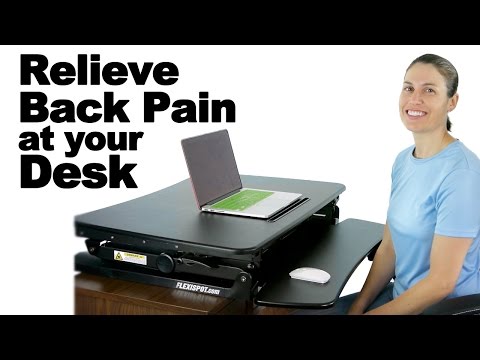
help relieve back pain is to have a sit
to stand desk, and the folks at FlexiSpot
sent us their sit to stand desk,
which is really nice. You can see here
it's got a little area for your mouse
and for your keyboard, and it's got this
little nice spot here where there's some
holes so you can put the cords
underneath, so you don't have cords all
over the place. So this sitting right
here now is a great position if I have
my keyboard here because I'm in that
nice comfortable position. If I'm using
my laptop, I'd probably want it to go a
little bit lower or bring my chair up a
little bit higher to be in that nice
comfortable position, but the best thing
about this is after you sit for a while,
and you say okay I've been sitting a
little bit I need to stand up, you just
stand up,
then push the handles here, and it just
comes up on its own, so you don't even
have to pull hard it just has some
hydraulics on it where it comes up on
its own. And what I really love about
this sit to stand desk is you can do
different heights, so if you're tall
it goes up really high, and if you're
short you can bring it down a little bit.
So it doesn't really matter what the
desk that it's on the height because you
can adjust it so easily. So same thing
with the standing, you want your elbows
to be in that nice almost 90 degrees. It
can be a little bit less than that but
you want your shoulders to be
comfortable you don't want them hunched
up, you don't want to have to be reaching
down or something, so you can just sit
right here, I'd probably go just a little
bit lower with my laptop so it's sitting
nice and comfortably here, but you can
see how easy it is to move up and down,
and if you still have your keyboard here,
again you can bring it up higher so then
you have your monitor right at eye length so
you're not having to move your head down
like this or look up towards it, so you
can make it a nice neutral position. So I
really like that as well. The other way
to help relieve back pain when you're
working at your computer is to take
breaks about every 30 minutes. You should
probably stop for two to three minutes
and just do some simple stretches or
moving in place to get the blood flowing,
to make sure that you're not getting
pressure spots on your bottom, or your
legs which causes that numbness and
tingling all the way down into your feet.
So you can do some pretty simple things,
it doesn't have to be too crazy. If
you're typing a lot with your wrist you
might want to stretch those out a little
bit, so you don't get that carpal tunnel
syndrome, so something as simple is just
putting your hands out into a stop sign
position like this, and then bending them
and coming down this way. You don't
necessarily have to hold the stretch
just do a little pause, two to three
seconds, stop sign hands fingers open
coming down curling in making a fist, and
you'll feel the stretch on the top when
you go this way and on the bottom when
you go this way. Who is that?
Snd then so just doing that about five
times or so. If you want more of a
stretch, you can take your other hand and
then pull in that way and then hold the
stretch for a little bit longer 15-20
seconds, and then come back up this way
as well. So again holding that one a
little bit longer to get more stretch in
there. So if your wrists are bothering
you a little bit, that's a good way to
start there. Some other great exercises
for your legs, just to keep that blood
flowing and moving, so you don't get that
numbness and tingling in your legs, and
you can still be working while you do it,
is just marching in place. So again it
doesn't have to be anything specific,
you're just getting that blood flowing,
so just a little march in place you can
start off with 10 to 15 seconds, you can
work your way up to a minute, but again
just getting that blood flowing in there.
Also with your calves, if you're sitting
all day, you want to keep that blood
flowing in there to help prevent DVTs
if you have any issues with blood
circulation. So again just going up on
your toes, nice and slow down, and then
pull your toes up. So again you could be
doing this while you're working on your
computer, you don't necessarily have to
stop your work, you can be doing this the
whole time with this standing portion of
the desk. So just starting off with about
ten of those and then working your way
from there. Also a lot of times when we
sit for a long time, those hip flexor
muscles get really tight because they're
in that relaxed position for a really
long time, so when we sit those get
really really tight. So just standing in
place you can put one foot back keep
that leg straight bend the front one
forward, but keep your upper body nice
and straight. So you can see here where
I'm stretching that area a little bit, it
will also stretch your calf a little bit
too, so it's kind of a double stretch, and
just hold that stretch for about twenty
to thirty seconds, switch sides, go
forward, but the important part to really
get that hip flexor is to keep your
upper body straight when you go forward.
So not leaning like this, that will just
get the calf, but going forward like this
and that will get the calf in the hip
flexor. So you know 30 seconds stretch 2
or 3 on each side, just to get you moving.
So again it doesn't have to be a formal
stretch workout, it's just to keep you
moving while you're standing up, but this
having a sit to desk, sit to desk,
sit-to-stand desk is really great because
then you can go back and forth
throughout the day because you know if
you are standing all day long you might
get really fatigued, especially if you
haven't done it all day. If you're
interested in checking these out, they
have a whole bunch of different kinds of
products. They have a different colors as
you can see here, and there are different
sizes as well. So some are a little bit
bigger, some are a little bit smaller, but
they all do the lifting and going down
really easily with those hydraulics to
make it a nice smooth going up and down,
and they have several other
products as well to keep you moving
throughout the day while you're working
at your desk. So if you're interested in
purchasing the product, you can click on
this button up here, and don't forget to
subscribe to our channel by clicking
here. And remember, be safe, have fun, and I
hope you feel better soon.




Không có nhận xét nào:
Đăng nhận xét